Discovery
Customers search by provider, service, city, style category, portfolio signal and availability.
Salon • Barber • Beauty Booking
Crown & Comb connects customers with trusted salons, barbers, stylists and beauty providers, while giving providers the web tools to manage schedules, clients, services, waitlists and growth.
A high-trust booking layer for customers. A real mobile operating system for salons, barbers, beauty professionals and suppliers.
For customers
Crown & Comb reduces the friction of beauty booking. Customers can discover providers, compare services, check availability and move from inspiration to appointment without calling multiple shops.
For providers and suppliers
The provider workflow is built for salons, barbers, independent stylists, beauty professionals and suppliers that need clean control over demand, clients and repeat business.
Customers search by provider, service, city, style category, portfolio signal and availability.
Appointments move through a clear path: provider, service, date, time slot and confirmation.
Providers keep demand visible when calendars are full and recover revenue when openings appear.
Scheduling, CRM, services, marketing and customer communication stay in one operational layer.
About Crown & Comb
Crown & Comb brings salon, barber and beauty booking into one clear product experience: customers discover and book trusted providers, while professionals manage availability, clients, services and demand from the app.
Search by service, style, location and availability before choosing the provider that fits the appointment.
Manage service menus, schedules, client records and repeat bookings from a clean business dashboard.
Create a direct route for beauty suppliers to connect with salons, barbers and independent professionals.
Experience design
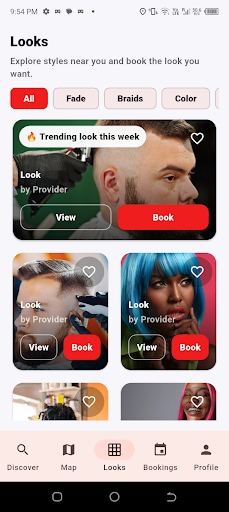
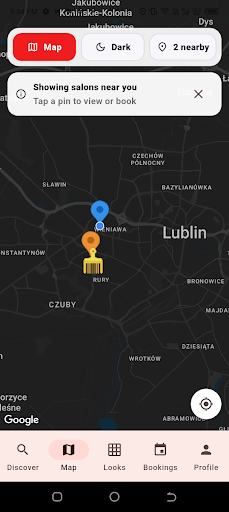
Customers browse looks, style categories and nearby providers before choosing where to book.
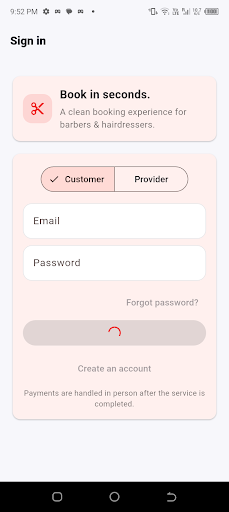
The sign-in and account flow keeps customer, provider and supplier paths clear inside one app experience.
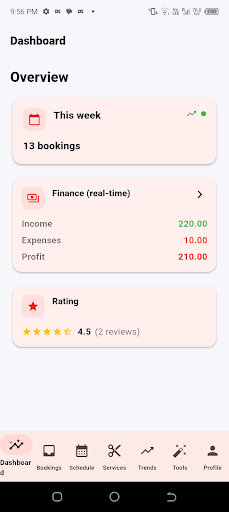
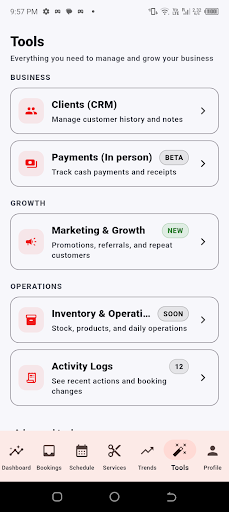
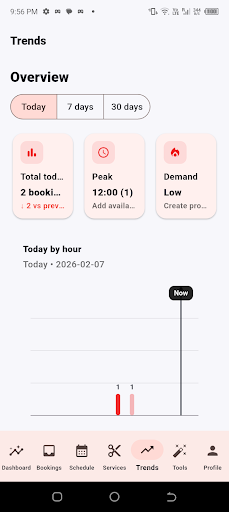
Providers see bookings, finance, ratings, tools and demand trends from a clean mobile operating layer.
Product interface
Every featured screen supports the core user journey: account entry, style discovery, map search, provider dashboard, operational tools and demand insights.
App flow
Watch the edited walkthrough, then follow the account flow below. The guide covers sign-up, customer booking, provider operations and supplier entry.
Start from the web app or Android APK. Choose the correct role, then create an account with your display name, email address and password.
Customers book services. Providers manage services and appointments. Suppliers use the provider / supplier entry for business onboarding and operational access.
Customers search salons, barbers and beauty providers, use filters, view map results, review profiles, compare ratings and browse looks before booking.
Choose a provider, select the service and time, confirm the appointment, then use bookings and messages to keep the visit organised.
Providers complete business profile details, add services with pricing and duration, configure working hours and prepare the profile for customer discovery.
Use the dashboard, bookings, waitlist, finance, CRM, marketing and activity logs to manage demand, clients and business growth from one place.
For people who want to discover providers, browse looks, compare locations and book salon, barber or beauty appointments.
For salons, barbers, stylists, nail technicians and beauty professionals managing services, availability and customer demand.
For beauty-related suppliers and business partners using the provider / supplier pathway to create a commercial account and begin onboarding.
Account creation
Create a customer account, apply as a provider or continue as a supplier through the Crown & Comb account entry.
Open account entryTrust and support
Profiles communicate ratings, review counts and portfolio work so customers can compare before booking.
Provider onboarding supports a clear path for business details, profile quality and future admin review.
The public website is structured for secure hosting, clear customer education and safe app access.
Customers, providers and suppliers can reach Crown & Comb by email, phone or WhatsApp for account, booking and onboarding support.
Download
Book appointments, discover providers, explore looks and manage business tools from one clean Crown & Comb experience.
Android APK, Google Play testing and Microsoft Store access are available. iOS coming soon.
Questions
Contact
Reach Crown & Comb for customer support, provider onboarding, supplier enquiries, app installation help and partnership conversations.
Complete the form and your email app will open with a ready-to-send message addressed to the official support inbox.